http://www.imaging-resource.com/PRODS/pentax-k3/pentax-k3A.HTM
Same as what DPR said, colour inaccuracy is below average and is yet a problem.
Performance wise, the K-3 is slow in shutter lag, which is close to 1/10 second fastest, and is actually worse than that of the original K-7/K-5.
Showing posts with label K-7. Show all posts
Showing posts with label K-7. Show all posts
Tuesday, May 06, 2014
Saturday, March 08, 2014
New Firmwares for Pentax Cameras
http://news.ricoh-imaging.co.jp/rim_info2/support/
To support the new 1.4X Tele Converter.. But as I said before, this method of updating firmwares to support every new lens is actually plain stupid. They should consider to do it in the Canon's way, i.e., to update the software utility that can be used to load the new lens' data into different bodies, of various models.
To support the new 1.4X Tele Converter.. But as I said before, this method of updating firmwares to support every new lens is actually plain stupid. They should consider to do it in the Canon's way, i.e., to update the software utility that can be used to load the new lens' data into different bodies, of various models.
Sunday, April 28, 2013
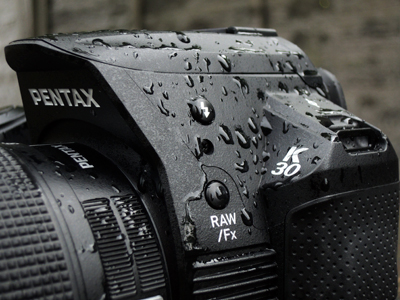
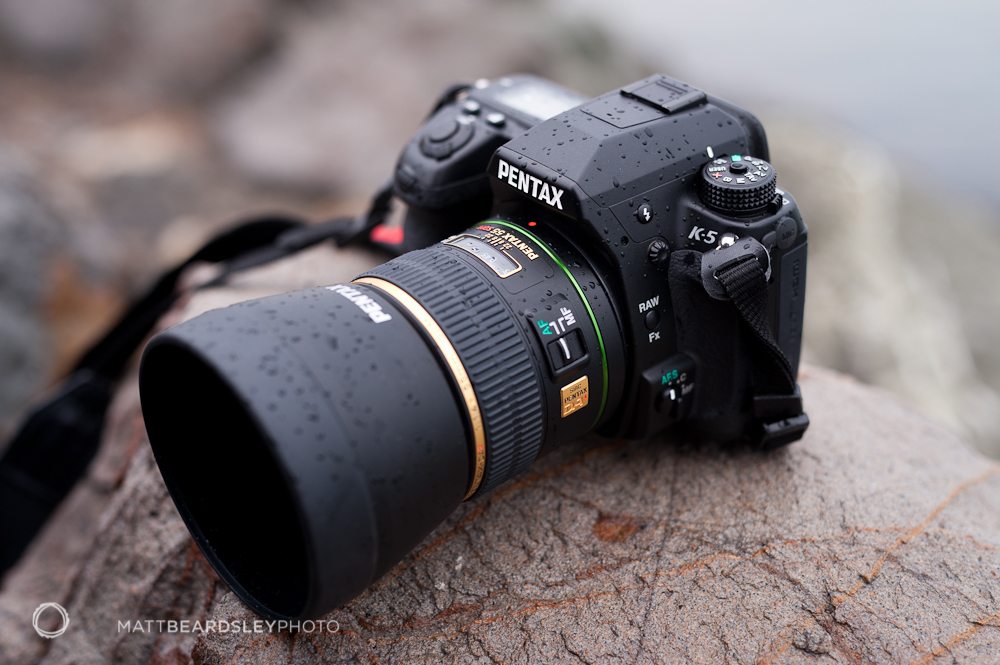
The Pentax Coffins! >:-o
The K-30 is in the Chinese style, for its top/head/front! :-o


On the other hand, the K-7/K-5 is in Western style! :-D

* All the pictures above are searched via Google Pics and linked directly to their respective web links as posted.
Now, I know why Pentax needed to hire Marc Newson to design the K-01! Otherwise, their own designers seemed to get no idea on what to do, so that they finally decided to copy ideas from something ordinary, which are yet much related to real-life! So, after all, as a Pentax user, would you prefer a "brick" or a "coffin"? Your take! Lol.. ;-p
On the other hand, the K-7/K-5 is in Western style! :-D
* All the pictures above are searched via Google Pics and linked directly to their respective web links as posted.
Now, I know why Pentax needed to hire Marc Newson to design the K-01! Otherwise, their own designers seemed to get no idea on what to do, so that they finally decided to copy ideas from something ordinary, which are yet much related to real-life! So, after all, as a Pentax user, would you prefer a "brick" or a "coffin"? Your take! Lol.. ;-p
Saturday, December 29, 2012
Shutter Life Survey Database of DSLRs
http://www.olegkikin.com/shutterlife/
Six models of Pentax DSLRs are included. The results can also be compared to other camera models of other makes as well.
Six models of Pentax DSLRs are included. The results can also be compared to other camera models of other makes as well.
Friday, November 09, 2012
Method to Force DFS Off for Pentax DSLRs
A working method with full instructions can be found here:-
http://pentaxda.deviantart.com/journal/Turning-DFS-Off-224124268
For the files that are mentioned and needed, they can be downloaded here directly, if you just don't know how to compile them yourself:-
http://darky.is-a-geek.net/debug_mode/disable_dfs.zip
This may be useful for those who need to do astro-photography in a continuous way without any interruption for longer time exposure per shot.
As for the latest Pentax DSLR models after K-r (i.e., K-r, K-5, K-30, K-5II and IIs) that cannot open the Debug mode by the above method, you can try to use the PK Tether software and then load the SYSPARAM.TXT file at the SD Card Root to see if it works or not! And please let us know about your result if you really try!
Btw, today, I've just come across these photos taken by a Japanese with his EOS 60D and 10-17mm wide angle lens combo. They are quite nice, look:-
http://www.geocities.jp/tpkkagato/
(in Japanese)
N.B. Pentax DSLRs using the Samsung sensors (i.e., K20D and K-7) do not have any option to turn off the DFS (Dark Frame Subtraction) whereas other Pentax DSLRs using the Sony sensors can have the option to turn off DFS for exposure that is not longer than 30 seconds, otherwise DFS is forced to be turned on again.
Related:-
K-5 and K-r Debug Mode Unleashed, Finally!
Successfully Open the Debug Mode of My K-r! :-)
http://pentaxda.deviantart.com/journal/Turning-DFS-Off-224124268
For the files that are mentioned and needed, they can be downloaded here directly, if you just don't know how to compile them yourself:-
http://darky.is-a-geek.net/debug_mode/disable_dfs.zip
This may be useful for those who need to do astro-photography in a continuous way without any interruption for longer time exposure per shot.
As for the latest Pentax DSLR models after K-r (i.e., K-r, K-5, K-30, K-5II and IIs) that cannot open the Debug mode by the above method, you can try to use the PK Tether software and then load the SYSPARAM.TXT file at the SD Card Root to see if it works or not! And please let us know about your result if you really try!
Btw, today, I've just come across these photos taken by a Japanese with his EOS 60D and 10-17mm wide angle lens combo. They are quite nice, look:-
http://www.geocities.jp/tpkkagato/
(in Japanese)
N.B. Pentax DSLRs using the Samsung sensors (i.e., K20D and K-7) do not have any option to turn off the DFS (Dark Frame Subtraction) whereas other Pentax DSLRs using the Sony sensors can have the option to turn off DFS for exposure that is not longer than 30 seconds, otherwise DFS is forced to be turned on again.
Related:-
K-5 and K-r Debug Mode Unleashed, Finally!
Successfully Open the Debug Mode of My K-r! :-)
Friday, October 12, 2012
Shutter Shake Problem is More Significant with Mirrorlesses than DSLRs!
See this article:-
http://cameraergonomics.blogspot.com/2012/09/micro-43-shutter-shock-revisited-omd-em.html
(Newly discovered website introduced by the 1001 Noisy Cameras.)
Well, we all know, DSLRs have mirror slap as well as the shutter movement that cause camera shakes right before the exposure and hence image blur. But then mirrorlesses have yet another shutter movement in lieu of the mirror slap, so the final results obtained could not be better! :-o
Btw, Sony has its electronic first curtain shutter by now in their latest NEX and A series bodies, I think it will decrease the shake effect and should improve shutter lag. However, the side-effect of it in particular to any possible impact on the IQ is yet unknown, if any. (I do not believe that it could be a perfect design, as for most of the time everything is just a trade-off!)
Previous Related (Latest First):-
A 5000 fps Video Showing Mirror and Shutter Vibrations of a DSLR (The High-speed Nikon D3)
K-5 Mirror Slap Blur Issue
K-5 Shutter Blur Effect Tested: K-5 is Half of That of the K-7, Told Lumo
The K-x Blur Issue
http://cameraergonomics.blogspot.com/2012/09/micro-43-shutter-shock-revisited-omd-em.html
(Newly discovered website introduced by the 1001 Noisy Cameras.)
Well, we all know, DSLRs have mirror slap as well as the shutter movement that cause camera shakes right before the exposure and hence image blur. But then mirrorlesses have yet another shutter movement in lieu of the mirror slap, so the final results obtained could not be better! :-o
Btw, Sony has its electronic first curtain shutter by now in their latest NEX and A series bodies, I think it will decrease the shake effect and should improve shutter lag. However, the side-effect of it in particular to any possible impact on the IQ is yet unknown, if any. (I do not believe that it could be a perfect design, as for most of the time everything is just a trade-off!)
Previous Related (Latest First):-
A 5000 fps Video Showing Mirror and Shutter Vibrations of a DSLR (The High-speed Nikon D3)
K-5 Mirror Slap Blur Issue
K-5 Shutter Blur Effect Tested: K-5 is Half of That of the K-7, Told Lumo
The K-x Blur Issue
Friday, April 20, 2012
Some Pentax Tidbits

Pentax gear is on the cover of the last issue of PopPhoto. An image of the cover is circulated around the net. Well, from the EXIF and GPS tags it can be seen that it was originally taken by someone at Melbourne using the iPad.
Btw, is the body a K-7 or K-5? As for the lens, it is just the original DA 18-55 (the first *ist DS/DL/K100D kit lens, non-WR). So, probably this lens can be thrown away after the modelling photo was taken, unless it was PSed! :-o And, I just wonder why the PopPhoto editors didn't wipe away also the Pentax and DA names from the lens front in the image so that they would not have freely advertised the camera gear for Pentax!
Next, here is an interesting video made with the Q. Wow, that's what the eyes of a dog would see across the streets in its daily life!
(URL: http://www.youtube.com/watch?v=9OqZpu9SRog)
Source: http://www.mediabistro.com/agencyspy/the-humane-society-gives-a-dogs-eye-view-of-life-on-the-streets_b31921
Well, this "application" shows the great value of a small and light camera! Btw, is the Pentax Q waterproof?! Why not just mounted an Optio WG? :-o
Tuesday, March 06, 2012
New Firmware Updates for 645D, K-5, K-r, K-x and K-7
For better support of SDXC cards:-
http://www.pentax.jp/japan/support/download/digital/645d_s.html
http://www.pentax.jp/japan/support/download/digital/k5_s.html
http://www.pentax.jp/japan/support/download/digital/kr_s.html
http://www.pentax.jp/japan/support/download/digital/kx_s.html
http://www.pentax.jp/japan/support/download/digital/k7_s.html
Update (3-6):-
It seems that there is a bug in this batch of firmware update that the user is required to do a complete reset to the camera after flashing the new firmware, otherwise strange things would happen! Just see two of the latest user reports on the issue:-
http://forums.dpreview.com/forums/readflat.asp?forum=1036&thread=40820302
http://forums.dpreview.com/forums/readflat.asp?forum=1036&message=40771664
[First Post: March 1, 2012; Last Edited: March 6, 2012]
http://www.pentax.jp/japan/support/download/digital/645d_s.html
http://www.pentax.jp/japan/support/download/digital/k5_s.html
http://www.pentax.jp/japan/support/download/digital/kr_s.html
http://www.pentax.jp/japan/support/download/digital/kx_s.html
http://www.pentax.jp/japan/support/download/digital/k7_s.html
Update (3-6):-
It seems that there is a bug in this batch of firmware update that the user is required to do a complete reset to the camera after flashing the new firmware, otherwise strange things would happen! Just see two of the latest user reports on the issue:-
http://forums.dpreview.com/forums/readflat.asp?forum=1036&thread=40820302
http://forums.dpreview.com/forums/readflat.asp?forum=1036&message=40771664
[First Post: March 1, 2012; Last Edited: March 6, 2012]
Wednesday, February 22, 2012
Debug Mode / AF Correction Quick Note and Update
Someone posted at the PF has found out that a -100 um correction in Debug mode is actually corresponding to -10 in the AF Fine Adjust menu. This actually coincides with my own experience and it would be somehow safe to conclude that ONE AF Fine Adjust correction unit corresponds to 10 um. That's why some Pentaxians were complaining about the inadequacy of this +/-10 units when some of their lenses were used on their Pentax DSLRs of which those combinations had even larger errors than the allowed correction range!
So, thanks to the author of the PK Tether, every Pentax DSLR user, including all those K-5 and K-r people, can now "debug" his/her own Pentax DSLR up to own's satisfaction, no matter how!
All Previous Related:-
Focus Adjust the K-5 and Pentax AF Lenses with Live View
Successfully Open the Debug Mode of My K-r! :-)
K-5 and K-r Debug Mode Unleashed, Finally!
K-x Debug Mode Tutorial - AF Adjustment
UPDATED: New Method to Access the Debug Mode of Various Pentax DSLRs
K-m Debug Mode Unleashed! (For AF Correction)
K10D Firmware 1.3 Debug Mode Unleashed
So, thanks to the author of the PK Tether, every Pentax DSLR user, including all those K-5 and K-r people, can now "debug" his/her own Pentax DSLR up to own's satisfaction, no matter how!
All Previous Related:-
Focus Adjust the K-5 and Pentax AF Lenses with Live View
Successfully Open the Debug Mode of My K-r! :-)
K-5 and K-r Debug Mode Unleashed, Finally!
K-x Debug Mode Tutorial - AF Adjustment
UPDATED: New Method to Access the Debug Mode of Various Pentax DSLRs
K-m Debug Mode Unleashed! (For AF Correction)
K10D Firmware 1.3 Debug Mode Unleashed
Tuesday, February 21, 2012
Changing the Focusing Screen of K-5 - Tips and Techniques
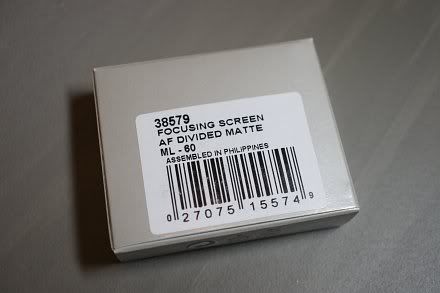
I have acquired a ML-60 focusing screen kit recently, which is a good replacement on the standard screen come with the body and it helps a lot in framing and levelling. It is especially fast and practical to use this "eyeball" method rather than relying on the indication by the electronic viewfinder, IMHO. Furthermore, I've found that the build quality of the screen and the bundled tweezers (i.e., the tool) are high and the packing is also well made and clean.

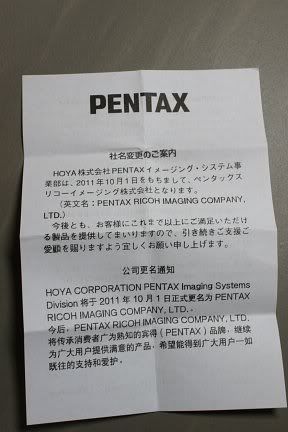
Together with the instruction sheet, there is also a notice for the change of company name from Hoya to Pentax Ricoh, in Japanese, English and French:-
The screen is replaceable by the user, but it is not completely straight-forward and safe from risk, because the screen is quite vulnerable and could be easily got scratched. Do first read clearly the official instructions and use *only* the dual-head tweezers that is provided. However, I don't think the instructions provided by Pentax are clear and detailed enough. So, in this article, I would like to share my own experience and tell more of my tips for the useful techniques of mine and additional cautions that are to be taken.
The ML-60 instruction cannot be found and downloaded from any Pentax website AFAIK, the closest one in contents and yet is downloadable from the Internet would be the one of the (P)Z-1p, available here.
Here is the full instruction of mine, which should including the basic instructions provided by Pentax:-
0. Prerequisite: Do the job at a clean and dry place! And under bright light source!
1. Turn off the camera;
2. Remove the lens and locate the focusing screen holding frame retainer which is a lock at the top middle:-
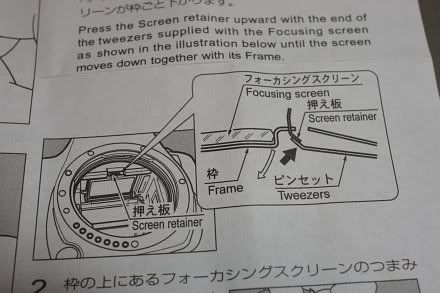
3. Incline the camera at 45 degrees (e.g., held by the left hand) such that it is not rested completely with the bottom nor rest with the rear screen, but somewhere in-between! (Will explain below for why this is crucial and recommended!)
4. Use the curved long end of the tweezers to "hook" the lock of the retainer upwards to the mount and the focusing screen holder will come off. The focusing screen, with its holder, are actually coming off together by *gravity*:-
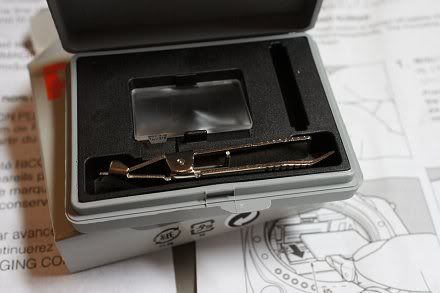
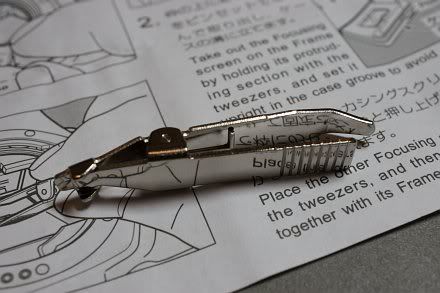
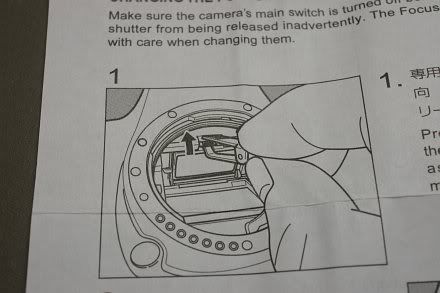
Now, let me explain, if the camera is rested on its bottom, the gravity force may be too large such that it comes off too fast and suddenly and the screen may jump off accidentally so it might be scratched! :-o On the other hand, if the camera is put with the LCD rested on the table, the focusing screen and holder may not come off as the gravity force cannot be applied effectively in that direction! So, a 45-degree inclination is recommended! And this has never been told by Pentax in any of their official documentations provided to the end-users, camera model regardless! :-(
Now that reminds me of Canon's design of the tweezers which is just safer and clever as there is also a special protruding small part to hold securely the frame holder *at the same time* when the retainer is unlocked, whilst Pentax' design has none! :-o
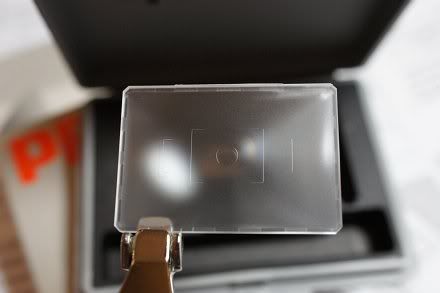
5. Swap the tweezers in opposite direction and use the other flat and shorter end with special shape to grip the protruding small part (where the focusing screen model number is printed) to pick the screen out of the box. My own tip is do remember to push the tweezers head until it completely holds the focusing screen with its bottom (which is like a flat spoon) and with both the left and right tips/hands of the tweezers head are in contact with the screen, like this:-
Push with small force as instructed above so that you can feel that everything is secured as it is designed. (But yet it is not clearly told!)
Don't apply too much force as the screen may be pushed off the holder frame and it would yet be scratched!
6. Pick out the screen with great care and put it into the transitional spare foam slot that is used for screen swapping;
7. Pick out the new replacement screen with the same technique for picking the screen as briefed in Step 5 above. Point it to a bright light source and inspect for dust:-
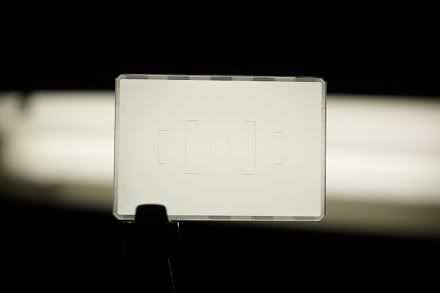
Use an air-blower to blow off any dust that is existent on the focusing screen surfaces as seen, especially for the upper inner surface which cannot be blown for any attached dust once the screen is installed and until it is uninstalled again- Pentax' instruction has never reminded the user to inspect and blow off the dust, although once again it may be sort of common sense, but still I think this essential reminder should be given;
8. After the "cleaning" has been done, carefully put the screen back onto the holder frame so that it should NOT be in touch with *anything* until it finally land and rest evenly and correctly within the frame holder;
9. Swap the tweezers' end again and use the curved long nose to push back the focusing screen holder until a click sound is heard. The screen is installed successfully!
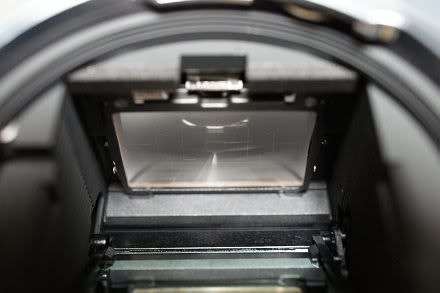
10. Point the camera to the light source, look from the mount (as above) and then look the viewfinder from different angles and do a final check if everything is okay! :-D
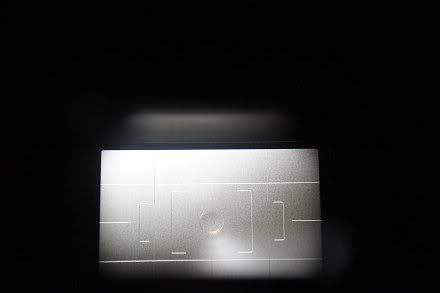
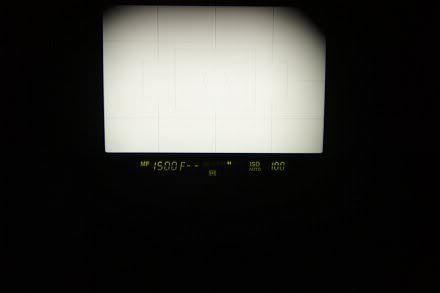
After all, this ML-60 screen is actually a very good piece of optional accessory and is very useful to help keeping proper levels for framing and picture composition and is highly recommended for every K-5/K-7 user! At least last time the Silver Limited edition of the K-5 is bundled with it. Highly recommended!
N.B. The focusing screens of the K-5/K-7 has more obvious matte which facilitate manual focusing and do have more accurate DoF than that of the lower grade Pentax penta-mirror DSLR models, for what I observed.
Read Also:-
When the Focusing Screen Lies (for Focusing and Metering)
When the Focusing Screen Lies - Part 2
Together with the instruction sheet, there is also a notice for the change of company name from Hoya to Pentax Ricoh, in Japanese, English and French:-
The screen is replaceable by the user, but it is not completely straight-forward and safe from risk, because the screen is quite vulnerable and could be easily got scratched. Do first read clearly the official instructions and use *only* the dual-head tweezers that is provided. However, I don't think the instructions provided by Pentax are clear and detailed enough. So, in this article, I would like to share my own experience and tell more of my tips for the useful techniques of mine and additional cautions that are to be taken.
The ML-60 instruction cannot be found and downloaded from any Pentax website AFAIK, the closest one in contents and yet is downloadable from the Internet would be the one of the (P)Z-1p, available here.
Here is the full instruction of mine, which should including the basic instructions provided by Pentax:-
0. Prerequisite: Do the job at a clean and dry place! And under bright light source!
1. Turn off the camera;
2. Remove the lens and locate the focusing screen holding frame retainer which is a lock at the top middle:-
3. Incline the camera at 45 degrees (e.g., held by the left hand) such that it is not rested completely with the bottom nor rest with the rear screen, but somewhere in-between! (Will explain below for why this is crucial and recommended!)
4. Use the curved long end of the tweezers to "hook" the lock of the retainer upwards to the mount and the focusing screen holder will come off. The focusing screen, with its holder, are actually coming off together by *gravity*:-
Now, let me explain, if the camera is rested on its bottom, the gravity force may be too large such that it comes off too fast and suddenly and the screen may jump off accidentally so it might be scratched! :-o On the other hand, if the camera is put with the LCD rested on the table, the focusing screen and holder may not come off as the gravity force cannot be applied effectively in that direction! So, a 45-degree inclination is recommended! And this has never been told by Pentax in any of their official documentations provided to the end-users, camera model regardless! :-(
Now that reminds me of Canon's design of the tweezers which is just safer and clever as there is also a special protruding small part to hold securely the frame holder *at the same time* when the retainer is unlocked, whilst Pentax' design has none! :-o
5. Swap the tweezers in opposite direction and use the other flat and shorter end with special shape to grip the protruding small part (where the focusing screen model number is printed) to pick the screen out of the box. My own tip is do remember to push the tweezers head until it completely holds the focusing screen with its bottom (which is like a flat spoon) and with both the left and right tips/hands of the tweezers head are in contact with the screen, like this:-
Push with small force as instructed above so that you can feel that everything is secured as it is designed. (But yet it is not clearly told!)
Don't apply too much force as the screen may be pushed off the holder frame and it would yet be scratched!
6. Pick out the screen with great care and put it into the transitional spare foam slot that is used for screen swapping;
7. Pick out the new replacement screen with the same technique for picking the screen as briefed in Step 5 above. Point it to a bright light source and inspect for dust:-
Use an air-blower to blow off any dust that is existent on the focusing screen surfaces as seen, especially for the upper inner surface which cannot be blown for any attached dust once the screen is installed and until it is uninstalled again- Pentax' instruction has never reminded the user to inspect and blow off the dust, although once again it may be sort of common sense, but still I think this essential reminder should be given;
8. After the "cleaning" has been done, carefully put the screen back onto the holder frame so that it should NOT be in touch with *anything* until it finally land and rest evenly and correctly within the frame holder;
9. Swap the tweezers' end again and use the curved long nose to push back the focusing screen holder until a click sound is heard. The screen is installed successfully!
10. Point the camera to the light source, look from the mount (as above) and then look the viewfinder from different angles and do a final check if everything is okay! :-D
After all, this ML-60 screen is actually a very good piece of optional accessory and is very useful to help keeping proper levels for framing and picture composition and is highly recommended for every K-5/K-7 user! At least last time the Silver Limited edition of the K-5 is bundled with it. Highly recommended!
N.B. The focusing screens of the K-5/K-7 has more obvious matte which facilitate manual focusing and do have more accurate DoF than that of the lower grade Pentax penta-mirror DSLR models, for what I observed.
Read Also:-
When the Focusing Screen Lies (for Focusing and Metering)
When the Focusing Screen Lies - Part 2
Wednesday, February 08, 2012
Definite Guide on External Video Microphone Selection for Supported DSLRs (Brand Regardless)
In the course of finding the best suitable external stereo microphone for my K-5 for video recording, I have considered the following products and I think it would be good for me to summarise what I have researched, tabulated as follows:-
Notes:-
1. Proper matching the Input Impedance (requirement) of our cameras is utmost important! The Pentax DSLRs are specified in the user manuals that the user should find a 2.2k output impedance microphone for best performance. If the impedance of the microphone deviates too much from what the device is designed, sound level and quality will be degraded much as the impedances are not properly matched, resulting in audio power loss and distortion!
2. If your camera supports plug-in power, do find a microphone that can draw the plug-in power from the camera as far as possible. This is very convenient as you don't have to worry about the battery level of the battery in the mic and you don't have to turn on and off the microphone each time. Read the user manual of your camera, the plug-in power is provided via the input phone jack, e.g., Pentax K-5 can provide up to 2V for the plug-in power, which should be adequate for most of the microphones that typically work at 1.5V.
Do note that not all DSLRs provide the plug-in power, earlier Canon and Nikon models that support the video function do not. So, do check before buy! In particular, for example, the Nikon ME-1 does NOT work on the Nikon D90 (but can on the K-5 instead!), as the D90 just does not have the plug-in power.
3. The Pana mic uses a smaller 2.5mm stereo phone jack instead of a 3.5mm one which is used for all other mics as listed above. If you just want to use it on Other Cams with a standard sized 3.5mm input jack, use/buy a radio shack adaptor.
4. The Sony mic has a special hot shoe type which only suits Sony DSLRs/SLTs but not others.
5. The Shock Mount is a structure that is built with rubber or other soft material that is put in between the mic and the hot shoe mount so as to minimise any noise that is transmitted mechanically from the camera body.
6. All models are bundled and supplied with a wind screen, which is made of higher density foam so as to stop wind from causing loud noise to the mic as recorded.
Well, after all, I chose and purchased the Azden SMX-20 locally, which seems to be the best compromise for the feature set and the price/performance. It is yet not too large and heavy, I think. I have carried out some preliminary tests for the mic, obvious it produces better sound than the built-in mono mic of my K-5. The sensitivity is good, sound level is appropriate (a little bit larger than that of the K-5), noise floor is low, stereo sound image and formation is good. Actually, I like it very much for the first day of use. Will see later if it is used for recording musical performance is good enough or not and will see if the wind screen will cut the wind sound efficiently at outdoor and on windy days. Finally, with that external mic with the built-in shock mount, I can now turn the Movie sensor-shifted SR of my K-5 to On for video recording without recording the SR motors' (continuous) movement sound! Really NICE! :-D
| Make/Model | Stereo | Output Impedance (Ohms) [See Note 1] | Power Source [See Note 2] | Directivity (Pattern, Degrees) | High Pass / Low Cut Filter (Steps) | Specified Output SNR (dB) | Shock Mount Bundled [See Note 5] | Weight (grams) | B&H Current Price (US$) |
| Audio-Technica Pro-24CM | Yes | 600 | 2 x LR44 1.5V / Plug-in Power | 90 (X-Y Stereo) | No | 57 | No | 111 | $59 |
| Azden SMX-10 | Yes | 1.5k | 1 x AAA 1.5V | Super-cardioid, 120 | No | 60 | Yes | 52 | $65 |
| Azden SMX-20 | Yes | 1.5k | 1 x LR44 1.5V / Plug-in Power | Super-cardioid, 120 | No | 60 | Yes | 72 | $100 |
| Rode VideoMic | No (Dual Mono) | 200 | 1 x 9V | Super-cardioid, Unspecified Angle | 2 | 74 | Yes | 176 | $185 |
| Rode VideoMic Pro Compact | No (Dual Mono) | 200 | 1 x 9V | Super-cardioid, Unspecified Angle | 2 | 74 | Yes | 86 | $229 |
| Rode Stereo VideoMic | Yes | 200 | 1 x 9V | Super-cardioid, Unspecified Angle | 1 | 79 | Yes | 330 | $249 |
| Rode Stereo VideMic Pro | Yes | 200 | 1 x 9V | Super-cardioid, Unspecified Angle | No | 73 | Yes | 117 | $299 |
| Sennheiser MKE 400 | Yes | Not Specified | 1 x AAA 1.5V | Super-cardioid, Unspecified Angle | No | Not Specified | Yes | 60 | $200 |
| Nikon ME-1 | Yes | 2.2k | Plug-in Power (Only) | Uni-directional, Unspecified Angle | 1 | 60 | No | Not Specified | $129 |
| Panasonic DMW-MS1 [See Note 3] | Yes | Not Specified | 1 x AAA 1.5V | Not Specified | 1 | Not Specified | No | Not Specified | $95 |
| Sony ECM-ALST1 [See Note 4] | Yes | Not Specified | Unknown Battery | 90 / 120 | No | Not Specified | No | 52 | $114 |
| Chinese OEM Shotgun Model 108 | Yes | 200 | 1 x CR2 3V | 90 / 120 | No | 76 | No | Not Specified | $25 (Chinese Taobao Price) |
Notes:-
1. Proper matching the Input Impedance (requirement) of our cameras is utmost important! The Pentax DSLRs are specified in the user manuals that the user should find a 2.2k output impedance microphone for best performance. If the impedance of the microphone deviates too much from what the device is designed, sound level and quality will be degraded much as the impedances are not properly matched, resulting in audio power loss and distortion!
2. If your camera supports plug-in power, do find a microphone that can draw the plug-in power from the camera as far as possible. This is very convenient as you don't have to worry about the battery level of the battery in the mic and you don't have to turn on and off the microphone each time. Read the user manual of your camera, the plug-in power is provided via the input phone jack, e.g., Pentax K-5 can provide up to 2V for the plug-in power, which should be adequate for most of the microphones that typically work at 1.5V.
Do note that not all DSLRs provide the plug-in power, earlier Canon and Nikon models that support the video function do not. So, do check before buy! In particular, for example, the Nikon ME-1 does NOT work on the Nikon D90 (but can on the K-5 instead!), as the D90 just does not have the plug-in power.
3. The Pana mic uses a smaller 2.5mm stereo phone jack instead of a 3.5mm one which is used for all other mics as listed above. If you just want to use it on Other Cams with a standard sized 3.5mm input jack, use/buy a radio shack adaptor.
4. The Sony mic has a special hot shoe type which only suits Sony DSLRs/SLTs but not others.
5. The Shock Mount is a structure that is built with rubber or other soft material that is put in between the mic and the hot shoe mount so as to minimise any noise that is transmitted mechanically from the camera body.
6. All models are bundled and supplied with a wind screen, which is made of higher density foam so as to stop wind from causing loud noise to the mic as recorded.
Well, after all, I chose and purchased the Azden SMX-20 locally, which seems to be the best compromise for the feature set and the price/performance. It is yet not too large and heavy, I think. I have carried out some preliminary tests for the mic, obvious it produces better sound than the built-in mono mic of my K-5. The sensitivity is good, sound level is appropriate (a little bit larger than that of the K-5), noise floor is low, stereo sound image and formation is good. Actually, I like it very much for the first day of use. Will see later if it is used for recording musical performance is good enough or not and will see if the wind screen will cut the wind sound efficiently at outdoor and on windy days. Finally, with that external mic with the built-in shock mount, I can now turn the Movie sensor-shifted SR of my K-5 to On for video recording without recording the SR motors' (continuous) movement sound! Really NICE! :-D
Thursday, January 26, 2012
Focus Adjust the K-5 and Pentax AF Lenses with Live View
In this post, I am going to brief about a new method and the general procedures to calibrate (focus adjust) the AF accuracy of the (Pentax) DSLRs which are equipped with the Live View function.
Before going on, there is something to note about the Live View function (called "LV" thereafter) of those Pentax DSLRs, the aperture in the LV is controlled automatically by the camera body, in doubled f-stops per step from wide opened, according to the brightness level as metered, but NOT according to the set Av by the user nor by the camera in Program mode. Just say for example that a F1.4 Pentax prime is mounted onto the K-5, the stepping is from wide opened and then to f/2.8 and then to f5.6 and then to f/11, as brightness rises. This is different from other ILDC cameras and systems like the Sony NEX, which always stopped down to the exact set Av no matter how.
So, here we go, the following are the detailed procedures which I have designed and recommended. Read in full and strictly following these for the best results:-
1. First of all, we need to find an ideal AF target. Find something that is flat in surface, with white background and dark but coarse *irregular* patterns, which shows the highest contrasts which are easily distinguishable, like this:-

I focused on the "Kleenex" words. On the other hands, objects with coloured patterns are not recommended so as to avoid the effect of Chromatic Aberration of a lens that might exist, e.g., red colour would front focus more for some lenses.
2. Mount the camera body with the lens you want to calibrate/focus adjust on a sturdy tripod. Put it in the environment that you want it to focus correctly, e.g. at a particular subject distance and the light source you used. For the sake of standardised calibration basis at my side, I put the object at a distance at about 2 metres from the camera and used an artificial light source at about 5200K to simulate the natural daylight.
3. Turn on the Live View of the camera, do the Live View CDAF, observe the focus scale. Repeat the CDAF three times to see if focus arrives at the same position. If it is (as it usually does), note down the exact position of it, take the picture and then switch off LV. Check if the picture is correctly focused (it usually is).
N.B.1. If the lens does not have a focus scale, stick on some marks by yourself.
N.B.2. Do observe about the aperture chosen by the LV by watching through the lens from the front which is according to the brightness level as what I have briefed in the beginning. If you want the lens to be wide opened for the calibration, the lighting level is required to be turned down a bit so as to make it!
For illustration purpose, say for example, I achieved the LV CDAF focus with a perfectly sharp picture with the lens focused at this position, according to the focus scale of the lens:-
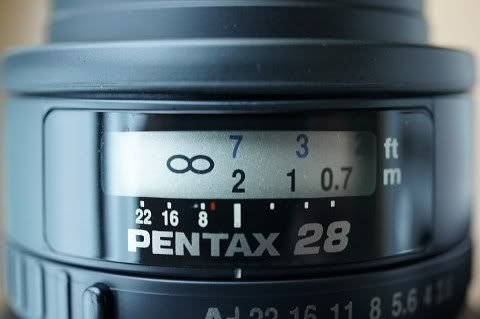
4. Go to the Custom Menu number 26 for "AF Fine Adjustment", select "Apply One" and you should see the "Unset" setting if the lens has not been calibrated before. Do note that the camera only supports Pentax lenses with an identifiable lens ID for the Pentax F series AF lenses or later.
5. Do the Phase Matching AF (PMAF) and see if it is front or back focused in comparison to what the Live View AF has determined. Do the PMAF for several times until the AF motor doesn't turn anymore.
If it is front focused, like this, key in a negative (-ve) value for the focus adjust:-
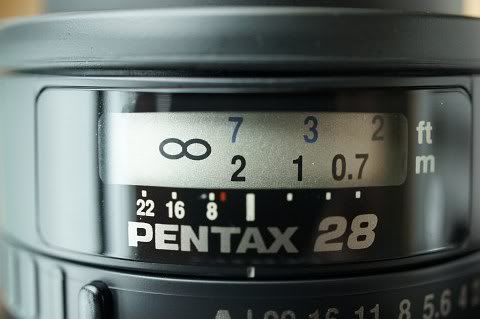
Otherwise, if it is back focused, like this, key in a positive (+ve) value instead:-
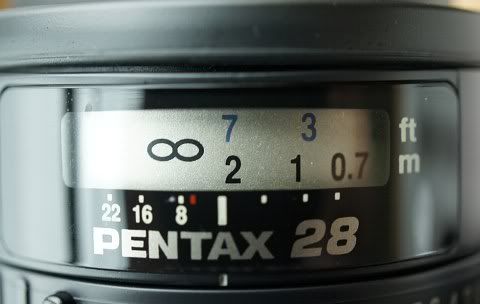
6. Key in the compensation focus adjust values by trial and errors until the PMAF completely agrees with the LV CDAF, i.e, turn on the LV mode, did the AF and then switch back to PMAF and re-do the AF, the lens focus ring should NOT turn, anymore.
So, we did it. Below are the results for some of my Pentax AF primes. I've noted that all my zoom lenses (no matter DA or FA) do not require any focus adjust before they were accurate but fast primes would. This may be owing to the lack of a f/2.8 AF sensor in any Pentax DSLRs, including the K-5. Thus, focus adjust by individual lens is essential and crucial:-
Good luck and happy measurebation! I hope that you would get razor sharp images with your Pentax primes (which are mostly capable of when focused correctly) after calibration with my above method! :-D One final reminder: Forget about all those "45 degree" inclined chart methods, which is not going to help you to do the job but would just create more confusions! Believe me.. The Live View will tell you the truth, really! Try it out by yourself! :-)
Related:-
K-5 and K-r Debug Mode Unleashed, Finally!
K-x Debug Mode Tutorial - AF Adjustment
Finally, I am Done! :-D
Before going on, there is something to note about the Live View function (called "LV" thereafter) of those Pentax DSLRs, the aperture in the LV is controlled automatically by the camera body, in doubled f-stops per step from wide opened, according to the brightness level as metered, but NOT according to the set Av by the user nor by the camera in Program mode. Just say for example that a F1.4 Pentax prime is mounted onto the K-5, the stepping is from wide opened and then to f/2.8 and then to f5.6 and then to f/11, as brightness rises. This is different from other ILDC cameras and systems like the Sony NEX, which always stopped down to the exact set Av no matter how.
So, here we go, the following are the detailed procedures which I have designed and recommended. Read in full and strictly following these for the best results:-
1. First of all, we need to find an ideal AF target. Find something that is flat in surface, with white background and dark but coarse *irregular* patterns, which shows the highest contrasts which are easily distinguishable, like this:-
I focused on the "Kleenex" words. On the other hands, objects with coloured patterns are not recommended so as to avoid the effect of Chromatic Aberration of a lens that might exist, e.g., red colour would front focus more for some lenses.
2. Mount the camera body with the lens you want to calibrate/focus adjust on a sturdy tripod. Put it in the environment that you want it to focus correctly, e.g. at a particular subject distance and the light source you used. For the sake of standardised calibration basis at my side, I put the object at a distance at about 2 metres from the camera and used an artificial light source at about 5200K to simulate the natural daylight.
3. Turn on the Live View of the camera, do the Live View CDAF, observe the focus scale. Repeat the CDAF three times to see if focus arrives at the same position. If it is (as it usually does), note down the exact position of it, take the picture and then switch off LV. Check if the picture is correctly focused (it usually is).
N.B.1. If the lens does not have a focus scale, stick on some marks by yourself.
N.B.2. Do observe about the aperture chosen by the LV by watching through the lens from the front which is according to the brightness level as what I have briefed in the beginning. If you want the lens to be wide opened for the calibration, the lighting level is required to be turned down a bit so as to make it!
For illustration purpose, say for example, I achieved the LV CDAF focus with a perfectly sharp picture with the lens focused at this position, according to the focus scale of the lens:-
4. Go to the Custom Menu number 26 for "AF Fine Adjustment", select "Apply One" and you should see the "Unset" setting if the lens has not been calibrated before. Do note that the camera only supports Pentax lenses with an identifiable lens ID for the Pentax F series AF lenses or later.
5. Do the Phase Matching AF (PMAF) and see if it is front or back focused in comparison to what the Live View AF has determined. Do the PMAF for several times until the AF motor doesn't turn anymore.
If it is front focused, like this, key in a negative (-ve) value for the focus adjust:-
Otherwise, if it is back focused, like this, key in a positive (+ve) value instead:-
6. Key in the compensation focus adjust values by trial and errors until the PMAF completely agrees with the LV CDAF, i.e, turn on the LV mode, did the AF and then switch back to PMAF and re-do the AF, the lens focus ring should NOT turn, anymore.
So, we did it. Below are the results for some of my Pentax AF primes. I've noted that all my zoom lenses (no matter DA or FA) do not require any focus adjust before they were accurate but fast primes would. This may be owing to the lack of a f/2.8 AF sensor in any Pentax DSLRs, including the K-5. Thus, focus adjust by individual lens is essential and crucial:-
| Lens | Focus Adjust Value as Measured | Conditions |
| FA 28/2.8 | -2 | 2m, 5200K, f/2.8 |
| DA 35/2.4 | 0 | 2m, 5200K, f/2.4 |
| FA 43/1.9 | +5 | 2m, 5200K, f/1.9 |
| DA 70/2.4 | -5 | 2m, 5200K, f/2.4 |
| FA 85/1.4 | 0 | 2m, 5200K, f/2.8 |
| DFA 100/2.8 | 0 | 2m, 5200K, f/2.8 |
Good luck and happy measurebation! I hope that you would get razor sharp images with your Pentax primes (which are mostly capable of when focused correctly) after calibration with my above method! :-D One final reminder: Forget about all those "45 degree" inclined chart methods, which is not going to help you to do the job but would just create more confusions! Believe me.. The Live View will tell you the truth, really! Try it out by yourself! :-)
Related:-
K-5 and K-r Debug Mode Unleashed, Finally!
K-x Debug Mode Tutorial - AF Adjustment
Finally, I am Done! :-D
Sunday, January 15, 2012
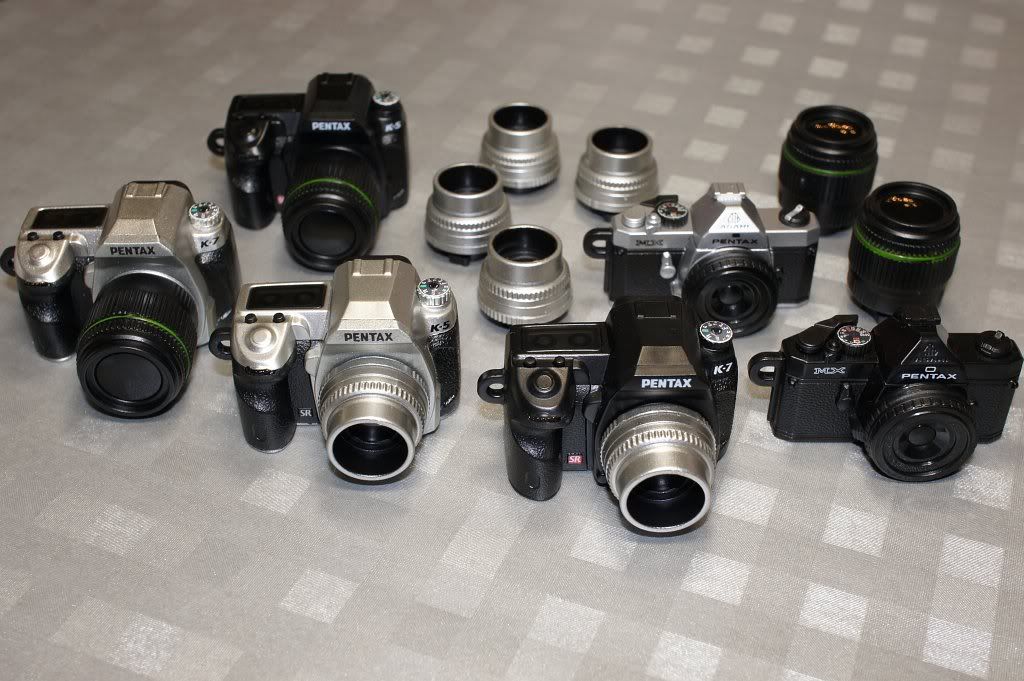
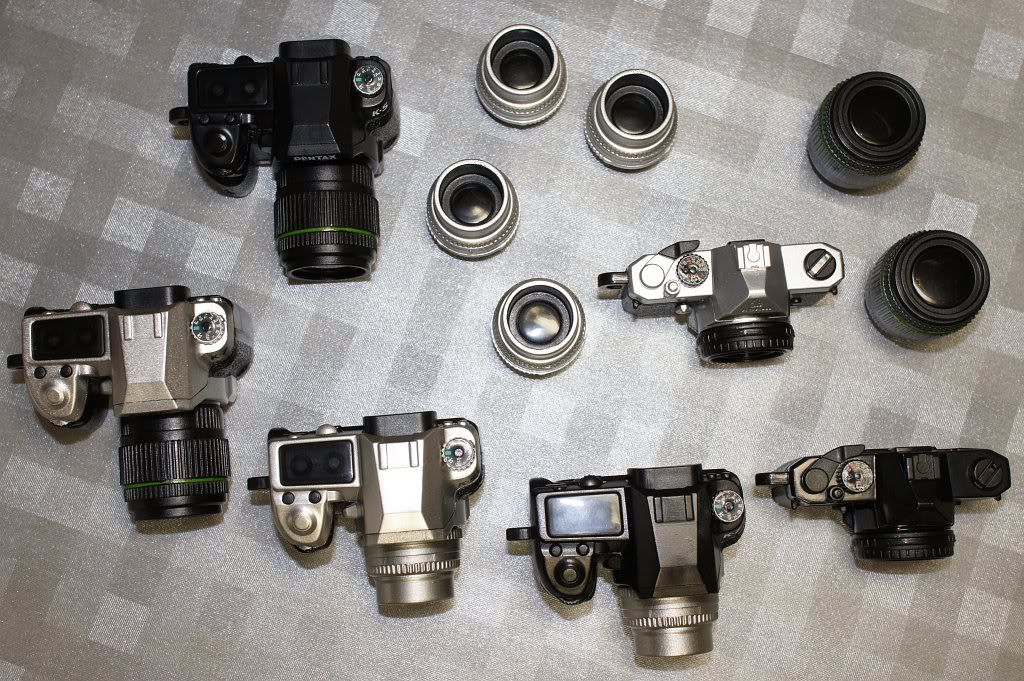
Latest Family Photos of My Pentax Gear! ;-D
Group Photos:-
Individual:-
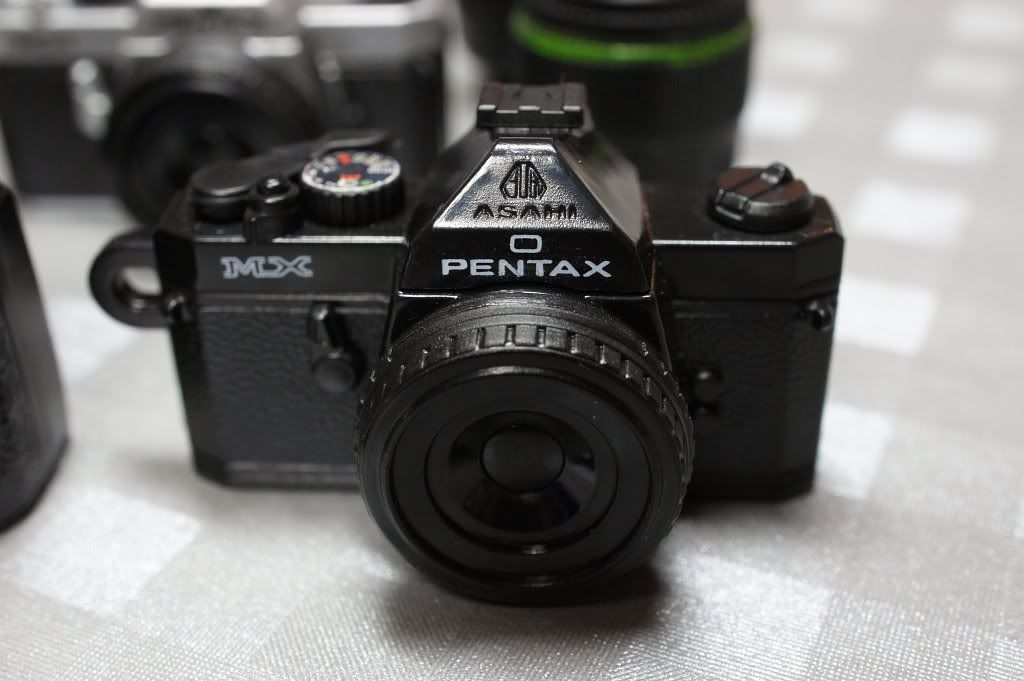


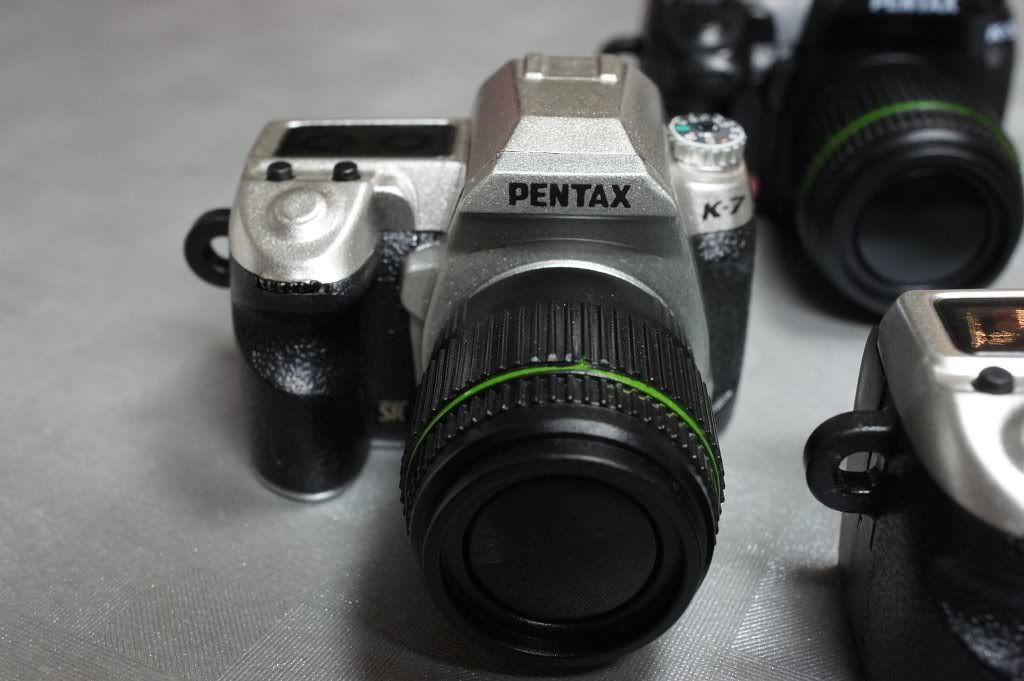
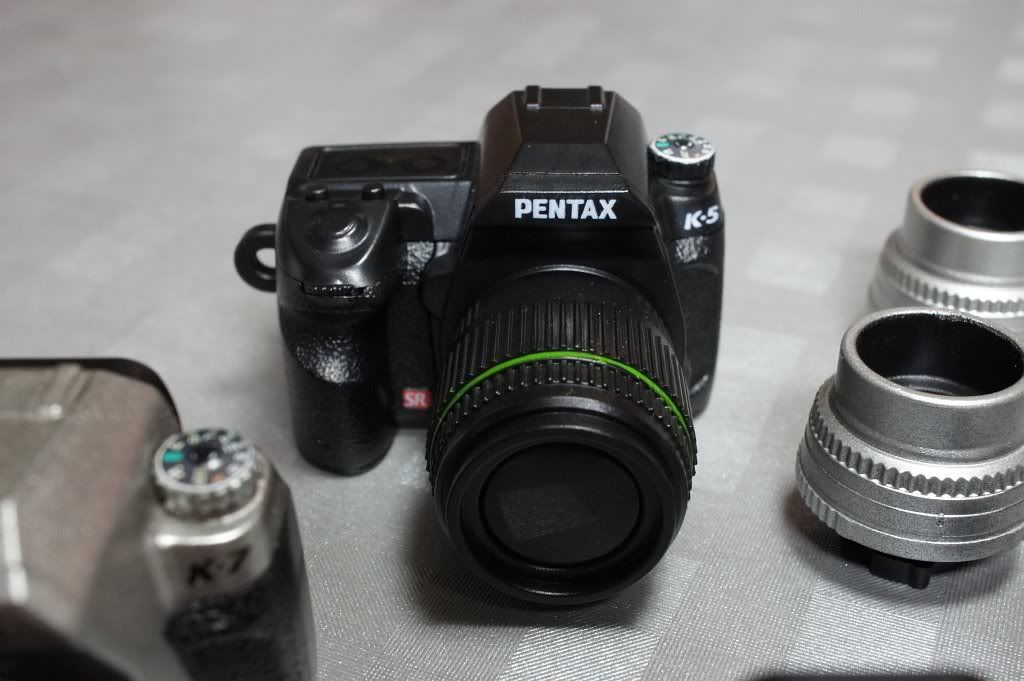
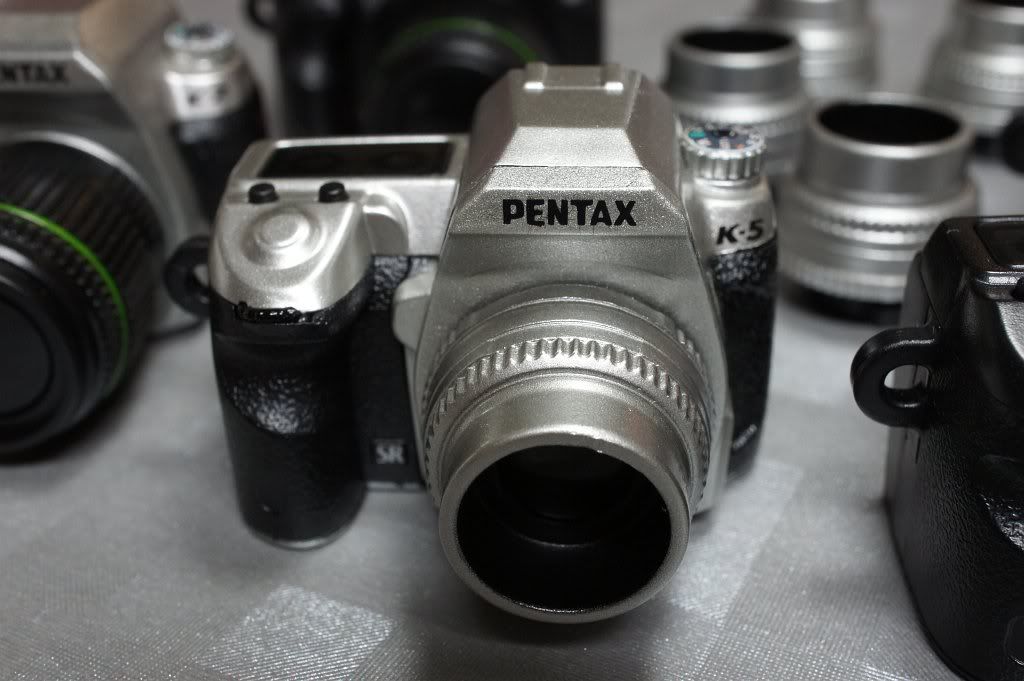
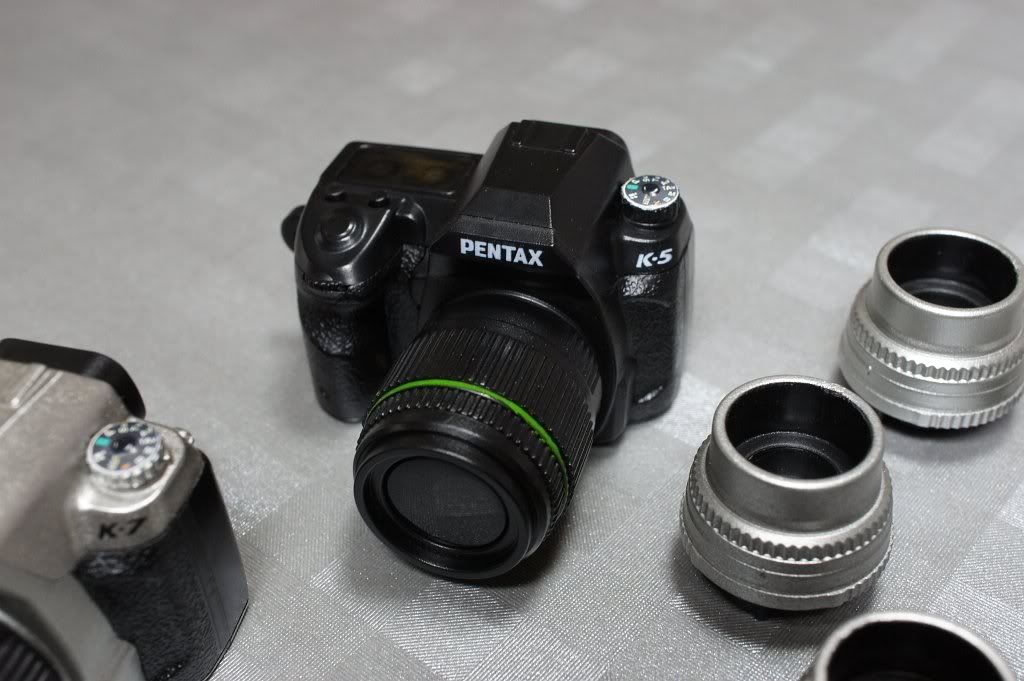
Now, you can see how many Pentax bodies and Pentax lenses that I actually have! ;-D
And, the mode dials of the cameras were actually put on by me myself! Well, if you want to do it like me, a punch and glue are required:-
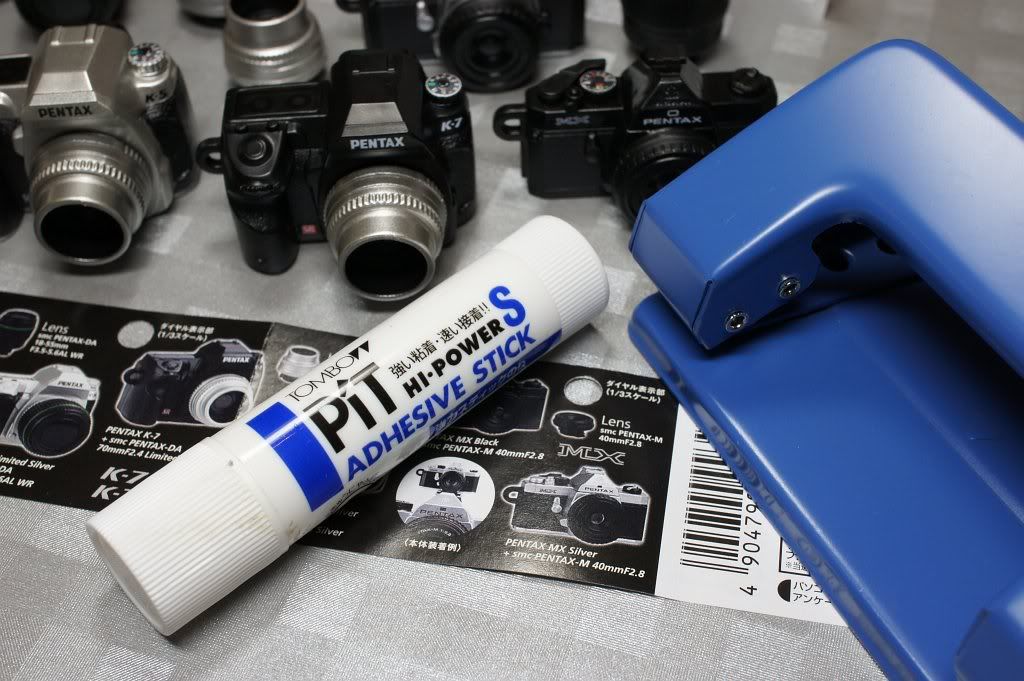
Below are the new different packages of the latest Pentax gear! :-D The colour coding is: Grey for MX Black, White for MX Silver, Blue for K-7 Black, Purple for K-7 Silver, Pink for K-5 Black and finally Green for K-5 Silver~ The cameras came in kits, all K-7s came with primes and K-5s came with zooms and yet MXes came with primes again~~
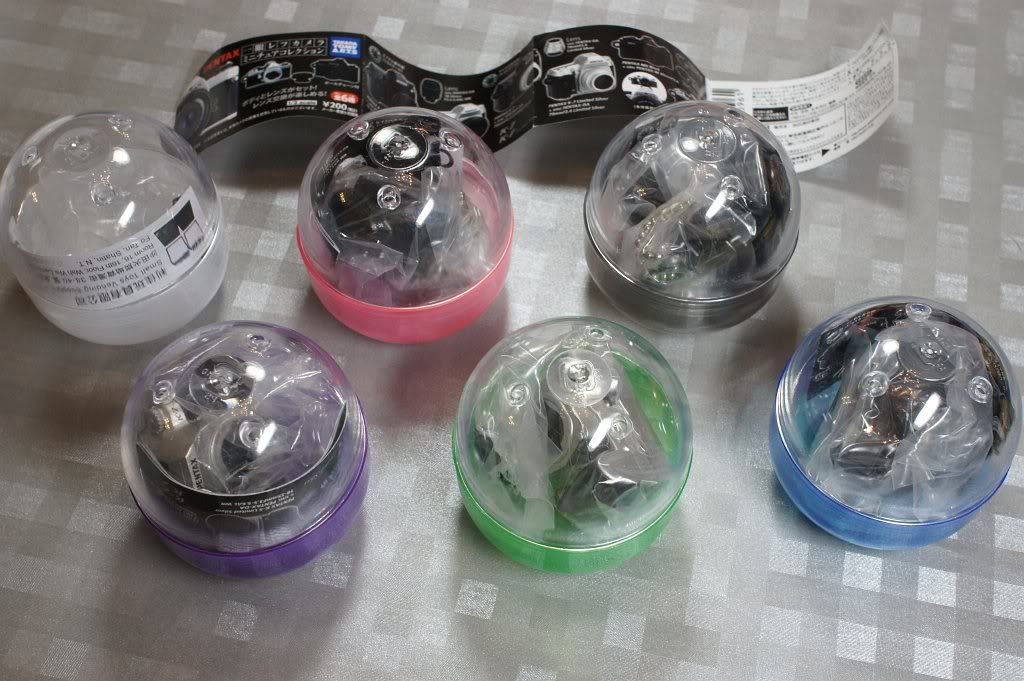
Last but not least, do note that in the above group photo(s) that there are six bodies (i.e. two MX, two K-5 and two K-7 bodies) and six FA 43 limited lenses but only four DA 18-55 WR and then only two M 40 pancake lenses. Why I acquired them in this way? :-o Just because only FA lenses have the FULL backward and forward compatibility with ALL Pentax bodies ever made but the DA lenses will not work on old film bodies (so four is enough even for matching one body with one lens! ;->) and then the M lenses work on all Pentax DSLRs in a rather handicapped way, with the crippled K-mount. Thus, I do not buy more as they are NOT completely compatible, i.e., with old M or K series Pentax lenses on *any* Pentax DSLR, wide open and real-time metering are actually both NOT possible! >:-(
Related:-
Pentax' Toy Policy Will Continue After Ricoh's Take-Over in October!
My K-r Toy Story! ;-D
Supported Pentax DSLR Functions with Different Pentax Lenses
Individual:-
Now, you can see how many Pentax bodies and Pentax lenses that I actually have! ;-D
And, the mode dials of the cameras were actually put on by me myself! Well, if you want to do it like me, a punch and glue are required:-
Below are the new different packages of the latest Pentax gear! :-D The colour coding is: Grey for MX Black, White for MX Silver, Blue for K-7 Black, Purple for K-7 Silver, Pink for K-5 Black and finally Green for K-5 Silver~ The cameras came in kits, all K-7s came with primes and K-5s came with zooms and yet MXes came with primes again~~
Last but not least, do note that in the above group photo(s) that there are six bodies (i.e. two MX, two K-5 and two K-7 bodies) and six FA 43 limited lenses but only four DA 18-55 WR and then only two M 40 pancake lenses. Why I acquired them in this way? :-o Just because only FA lenses have the FULL backward and forward compatibility with ALL Pentax bodies ever made but the DA lenses will not work on old film bodies (so four is enough even for matching one body with one lens! ;->) and then the M lenses work on all Pentax DSLRs in a rather handicapped way, with the crippled K-mount. Thus, I do not buy more as they are NOT completely compatible, i.e., with old M or K series Pentax lenses on *any* Pentax DSLR, wide open and real-time metering are actually both NOT possible! >:-(
Related:-
Pentax' Toy Policy Will Continue After Ricoh's Take-Over in October!
My K-r Toy Story! ;-D
Supported Pentax DSLR Functions with Different Pentax Lenses
Thursday, January 12, 2012
Pentax SLR Cameras 1952-2011

(Updated: Click Above to Download a Larger Poster!)
Source: Pentax Germany @ Google Plus
Via: Chassimages Pentax Forum
Btw, does it have a larger version? :-(
Read Also:-
A (Pentax) Camera Catalogue Collector
Pentax SLR Cameras 1952-2008
Major Canon Cameras 1930 to 2010
Saturday, December 03, 2011
Pentax UK and Pentax Germany Admitted K-r Tungsten Front Focusing Issue (But there is No Solution, as Both Clearly Told)
See these two reports and threads. They are 100% self-explanatory, with direct quotes from those Pentax officials:-
http://forums.dpreview.com/forums/readflat.asp?forum=1036&thread=39947770
http://forums.dpreview.com/forums/readflat.asp?forum=1036&thread=39975810
Btw, for what I have tested scientifically, that "specific spectrum of light" is called Infra Red. Red light does NOT cause any FF problem to the AF of the K-r, neither does the Green light, which *implies* Yellow light should NOT cause any problem neither! But since tungsten light sources do come with also strong IR spectra. So, it should be the real cause. I have also checked that adding a stronger Skylight 1B filter, which moderately suppresses both Green and Blue lights as well as IR, could lessen the FF very slightly. Thus, the dominant IR in environment should be the root cause to the problem as it is verified and re-confirmed.
After all, it seems that the AF sensors of the K-r are just too sensitive to IR but yet the IR cutting filter used in the AF module is either non-existent or is not strong enough and thus causing this problem - which could never be cured via firmware as it is a *hardware* issue, as I predicted on day one! (but then fanboys rebutted with NO ground and jumped on me, as usual!)
In fact, I confirmed this tungsten AF FF issue at the beginning of this year shortly after I purchased my K-r. I, as many other K-r users who have been suffering from the problem, of course was/were much disappointed for this step back of the SAFOX IX, especially for those who "upgraded" from a previous Pentax DSLR like the K-x and K-7, which do not have this severe issue.
Frankly, Pentax should have created a SAFOX IX-(minus) system instead of what is called the SAFOX+, adding what so-called an additional yellow-light detector won't help them and we end-users, BUT SIMPLY adding an IR cutting filter would! >:-(
Last but not least and still, here is my (repeated) advice for an interim measure to the problem: 1. Turn off the "AF Assist" light in the custom function and then 2. Set "AF Fine Adjust" to -10 (maximum value, my K-r usually focuses somehow acceptably at 0 under daylight for most of my Pentax lenses) and DO *remember* 3. Disable "AF Fine Adjust" after you return to non-tungsten environment and BEFORE you shoot! Easy Enough? :-o
Last Related:-
Still Annoying K-5 and K-r Old Issues, Users are Pissed Off!
http://forums.dpreview.com/forums/readflat.asp?forum=1036&thread=39947770
http://forums.dpreview.com/forums/readflat.asp?forum=1036&thread=39975810
Btw, for what I have tested scientifically, that "specific spectrum of light" is called Infra Red. Red light does NOT cause any FF problem to the AF of the K-r, neither does the Green light, which *implies* Yellow light should NOT cause any problem neither! But since tungsten light sources do come with also strong IR spectra. So, it should be the real cause. I have also checked that adding a stronger Skylight 1B filter, which moderately suppresses both Green and Blue lights as well as IR, could lessen the FF very slightly. Thus, the dominant IR in environment should be the root cause to the problem as it is verified and re-confirmed.
After all, it seems that the AF sensors of the K-r are just too sensitive to IR but yet the IR cutting filter used in the AF module is either non-existent or is not strong enough and thus causing this problem - which could never be cured via firmware as it is a *hardware* issue, as I predicted on day one! (but then fanboys rebutted with NO ground and jumped on me, as usual!)
In fact, I confirmed this tungsten AF FF issue at the beginning of this year shortly after I purchased my K-r. I, as many other K-r users who have been suffering from the problem, of course was/were much disappointed for this step back of the SAFOX IX, especially for those who "upgraded" from a previous Pentax DSLR like the K-x and K-7, which do not have this severe issue.
Frankly, Pentax should have created a SAFOX IX-(minus) system instead of what is called the SAFOX+, adding what so-called an additional yellow-light detector won't help them and we end-users, BUT SIMPLY adding an IR cutting filter would! >:-(
Last but not least and still, here is my (repeated) advice for an interim measure to the problem: 1. Turn off the "AF Assist" light in the custom function and then 2. Set "AF Fine Adjust" to -10 (maximum value, my K-r usually focuses somehow acceptably at 0 under daylight for most of my Pentax lenses) and DO *remember* 3. Disable "AF Fine Adjust" after you return to non-tungsten environment and BEFORE you shoot! Easy Enough? :-o
Last Related:-
Still Annoying K-5 and K-r Old Issues, Users are Pissed Off!
Wednesday, November 30, 2011
Supported Pentax DSLR Functions with Different Pentax Lenses
Read this question at the PF and I was surprised to see the reply by the site owner Adam (i.e., the first reply to the OP), which shows that Adam completely lacks the basic user/operation knowledge in using older manual (aperture) Pentax lenses on any Pentax DSLR! :-o
Maybe Adam has been given too many of the latest Pentax lenses (for "reviewing" or whatsoever) so that he has almost forgotten how older Pentax manual lenses would behave on all the Pentax digital bodies. Nevermind, I think it's my take now! Below are two summaries that I compile to let all my readers here know (or got refreshed for the knowledge if already known) about the basic technical features or limitations of our Pentax lenses back to the 60s of the last century and what they could or could not do for us with our Pentax DSLR bodies! :-)
N.B. I don't think that you can find ALL of the information below in any of the Pentax DSLR/lens user/operation manuals! ;-D
Table 1: Lens Data/Function Availability with different Pentax Lenses
Legend: Y= Yes/Available; "-" = No/Not Available; S = Supported depending on Lens Model (if Feature is Available)
*Remark: Limited/Partial Function - Only Auto Zoom Retract and Powered Zoom are Supported.
Table 2: Pentax DSLR Camera Function Availability with different Pentax Lenses
Legend: Y= Yes/Available; "-" = No/Not Available
Okay, is it and everything much clearer now? :-> And no need to make thanks to me, thank Adam instead! ;-p After all, I just won't make any reply over his premise to help others (and actually help him to make more money!) anymore (although Adam is really "kind" enough for not banning me!), as I decided and told two-and-a-half year ago! :-D
Further/Reference Read:-
K-Mount Metering and Exposure Bases - A Technical Brief
Related:-
Two Important Custom Functions for Proper Metering
Modding a Rikenon-P 50/1.7 Into an "A" Lens! :-o
Ten Things that I Want Ricoh to Do for Pentax
Hypocrites of the PentaxForums and Their Lies
Updating of my Blog Editing Direction
Maybe Adam has been given too many of the latest Pentax lenses (for "reviewing" or whatsoever) so that he has almost forgotten how older Pentax manual lenses would behave on all the Pentax digital bodies. Nevermind, I think it's my take now! Below are two summaries that I compile to let all my readers here know (or got refreshed for the knowledge if already known) about the basic technical features or limitations of our Pentax lenses back to the 60s of the last century and what they could or could not do for us with our Pentax DSLR bodies! :-)
N.B. I don't think that you can find ALL of the information below in any of the Pentax DSLR/lens user/operation manuals! ;-D
Table 1: Lens Data/Function Availability with different Pentax Lenses
| Lens Data and/or Function | Provision Means | M42 | K/M | _A_ | _F_ | _FA_ | FAJ/ DA/ DAL | DFA (1st Gen.) | DFA (2nd Gen.) |
| Wide-opened Metering | Instant Return Aperture Coupler | - | Y | Y | Y | Y | Y | Y | Y |
| Number of Steps Stopped-down (via Aperture Ring) | Mechanical Position Indicator | - | Y | Y | Y | Y | - | Y | - |
| Maximum Aperture | Array of Electrical Contacts | - | - | Y | Y | Y | Y | Y | Y |
| Minimum Aperture | Array of Electrical Contacts | - | - | Y | Y | Y | Y | Y | Y |
| Focal Length | (Advanced/Serial) Electronic Communication | - | - | - | Y | Y | Y | Y | Y |
| Focus Distance | Electronic Communication | - | - | - | Y | Y | Y | Y | Y |
| Lens ID | Electronic Communication | - | - | - | Y | Y | Y | Y | Y |
| MTF Data | Electronic Communication | - | - | - | - | Y | Y | Y | Y |
| Powered/Auto Zoom | Electronic Communication and KAF2 Power Contacts | - | - | - | - | S* | - | - | - |
| In-lens AF (SDM or DC Motor) | Electronic Communication and KAF2 Power Contacts | - | - | - | - | - | S | - | - |
Legend: Y= Yes/Available; "-" = No/Not Available; S = Supported depending on Lens Model (if Feature is Available)
*Remark: Limited/Partial Function - Only Auto Zoom Retract and Powered Zoom are Supported.
Table 2: Pentax DSLR Camera Function Availability with different Pentax Lenses
| Body Function | M42 | K/M | _A_ | _F_ | _FA_ | FAJ/ DA/ DAL | DFA (1st Gen.) | DFA (2nd Gen.) | *Remark |
| Wide-opened Metering | - | -* | Y | Y | Y | Y | Y | Y | Stopped-down metering is available with a push of button. |
| Multi-segment Metering | - | - | Y* | Y | Y | Y | Y | Y | Not as accurate as subject distance information is Not available (and hence is not included in the calculation). |
| Off-the-film TTL Flash Auto (*ist D and DS/DS2 Only) | Y | Y | Y | Y | Y | Y | Y | Y | TTL flash sensor underneath mirror is installed; No Pre-flash is required. |
| Off-the-film TTL Flash Auto (All Others) | - | - | - | - | - | - | - | - | No TTL flash sensor underneath mirror; P-TTL is mandatory for Auto Flash. |
| P-TTL (where P stands for Pre-flash) | - | - | Y* | Y | Y | Y | Y | Y | Not as accurate as subject distance information is Not available. |
| AF | - | - | - | Y | Y | Y | Y | Y | - |
| Lens Correction on Image | - | - | - | - | -/Y* | Y | Y | Y | Only the three FA Limited are Supported. |
Legend: Y= Yes/Available; "-" = No/Not Available
Okay, is it and everything much clearer now? :-> And no need to make thanks to me, thank Adam instead! ;-p After all, I just won't make any reply over his premise to help others (and actually help him to make more money!) anymore (although Adam is really "kind" enough for not banning me!), as I decided and told two-and-a-half year ago! :-D
Further/Reference Read:-
K-Mount Metering and Exposure Bases - A Technical Brief
Related:-
Two Important Custom Functions for Proper Metering
Modding a Rikenon-P 50/1.7 Into an "A" Lens! :-o
Ten Things that I Want Ricoh to Do for Pentax
Hypocrites of the PentaxForums and Their Lies
Updating of my Blog Editing Direction
Wednesday, November 16, 2011
K-r and K-x are Much Different!


Many people (especially those who have never used both cameras) mis-believe that they are close and similar enough and that the IQ *should be* the same. Yes, on paper it probably is. But after prolonged and extensive use of both cameras myself. I do find them to be quite different in many ways, from the IQ, to operation, and accuracy and them system performance, which I list the obvious ones as below:-
IQ aspect - colour response
The colour response of the K-x and K-r are different. With the same Custom Image (CI) and the same default parameters, they produce different colours. This can be confirmed when using the same lens and take pictures on the same scene side-by-side. Just say the Natural CI of the K-x is less saturated than the Natural CI of the K-r and that the Portrait CI of the K-x is more colour accurate than the Portrait CI of the K-r, which produces exaggerated Canikon entry level DSLRs alike colours.
IQ aspect - noise handling
The noise handling and behaviours at higher ISO of the K-x and K-r are somehow different. It seems that the K-r processes noise in a smoother way and image is less "discrete" after processing, which could look more pleasing especially when viewed at pixel level. However, for some cases, the K-x would retain more image details.
Operation - Handling and Build Quality
The K-x always feel more solid when held in hands, plus it is indeed somehow smaller (and slightly lighter too).
Operation/Performance - LiveView/Movie CDAF
Obviously, the CDAF of K-r is faster. And it seems to be more accurate too. The zooming-in of the part of image being focusing is also the unique characteristic of the K-r (ditto for the K-5), which cannot be disabled anyway.
Operation - Movie Recording
Despite both K-x and K-r are recording movie in Motion JPEG in 720p, I found that the Codecs used in the two cameras are NOT the same! I did encounter different playback behaviours/software compatibility issue with the K-r and K-x recorded videos. Say for example, with the same software player on the same machine, the K-x video could be played flawlessly whilst the K-r's could be played without sound. So, Pentax must have made some changes to the video codec, but yet which we do not know.
System Performance - Continuous AF
The K-r is the first Pentax DSLR that I found that the C-AF does work better and is practical to use in conjunction with the continuous shooting mode. It could keep track with the object with reasonably higher successful rate with acceptable focus (less OOF and blur) than the K-x and any other previous Pentax DSLRs. Indeed, putting a set of Lithium battery into the K-x could help it to focus faster but as for the C-AF successful rate, the difference is not noticeable (even the AF motor does turn faster).
System Performance - Continuous Shooting
Obviously, the actual frame rate of the K-r is much higher than that of the K-x, and is indeed is even better than that of the K-7.
But one thing I note that is in continuous shooting mode, the exposure of pictures in JPEG mode is not adjusted anymore, versus of what the camera will do in single-frame advance mode. As a result, it is quite likely that the user would see more under or over exposed pictures than normal, i.e., in single-frame advance mode. After all, the image processor must adjust something, so as to compensate for the exposure errors with different lenses (which was a true headache with all those older Pentax DSLRs, since the *ist D).
System Reliability - AF Accuracy
K-x does NOT front focus and back focus as much as the K-r when different lenses are mounted and especially under tungsten light environment, which with the K-r large degree of front focusing *must* be resulted. After all, the focusing accuracy of the K-x is better, and IMHO that it is even more stable than the K-5 for what I tested (that was one of the main reasons why I cancelled my K-5 purchase order! :-(). The K-x does have shift to front focus under tungsten light, but that amount of the shift is less than the K-r's such that the impact is not as dominant.
So, after all, I found that the two cameras are different and they do have different pros and cons of each own. But coincidently, they complement each other for many of the pros and cons and as such, I would select either K-x or K-r of mine for different shooting purposes for what each of them will perform better! For instance, if I need better image colour and focusing accuracy, I use the K-x. On the other hand, if I need need to shoot fast object and use continuous AF/higher frame rate, I use the K-r.
N.B. In order to have higher AF accuracy of the K-x, it *must* be debugged for the AF at the first place.
JUST Believe any or all of the above or not, as I would provide no further proof nor evidence. Nevertheless, I do hope that the above could be useful for all those Pentax users who are still deciding between the K-x and K-r, putting aside the most annoying battery issue of the K-x, of which finding a stable rechargeable power source is simply a headache! But then recently I have almost tackled this problem completely, nonetheless. Why I say that it is "almost"? It is just because the total energy capacity of the LiFePO4 rechargeable is still lower than desired, although it is not really much lower than any NiMH before the camera cuts off, just at slightly dropped lower voltage of the batteries.
Wednesday, November 09, 2011
Cable Control Your (Pentax) DSLRs Using iPhone
(Credit: DC Fever)
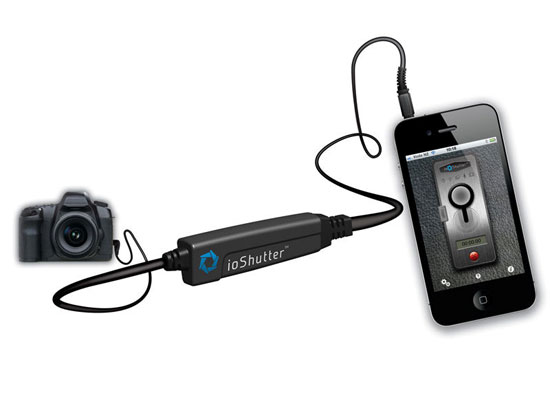
Using the ioShutter.
Now, if your Pentax DSLR has a cable release socket, then you can use your iPhone to fire the shutter remotely but wired, and with even more software control capabilities including interval shooting, programmable bulb and sound/movement trigger etc. A nice and welcome Pentax alternative of course. And with many people are having iPhones nowadays, it could come in handy, provided that the user also brings along with the proprietary interfacing release cable that is to be purchased from the ioShutter altogether with the App.
Related:-
Remote Control Your Camera Using Android Device
The Pentax (Electronic) Cable Switches
Tuesday, October 18, 2011
What Will be My 10th/Next DSLR/ILDC Body?
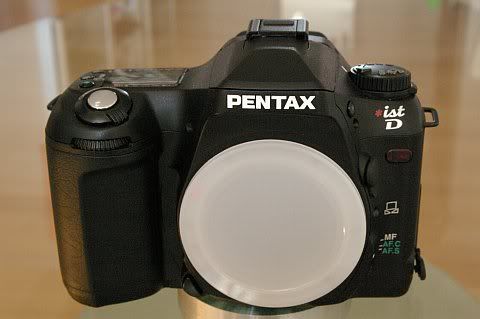
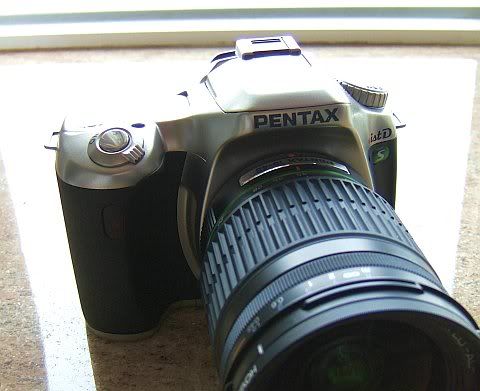
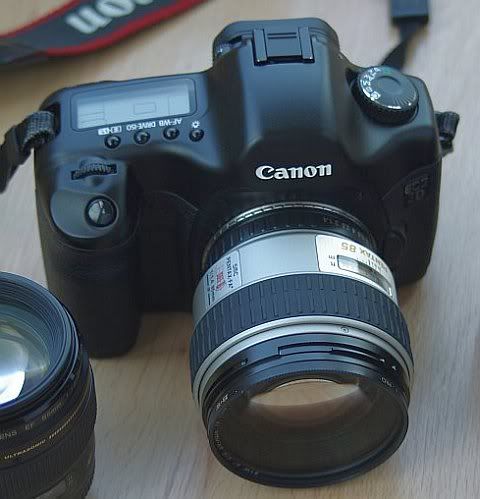
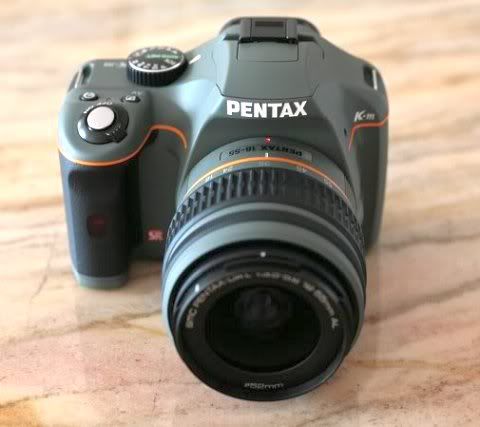
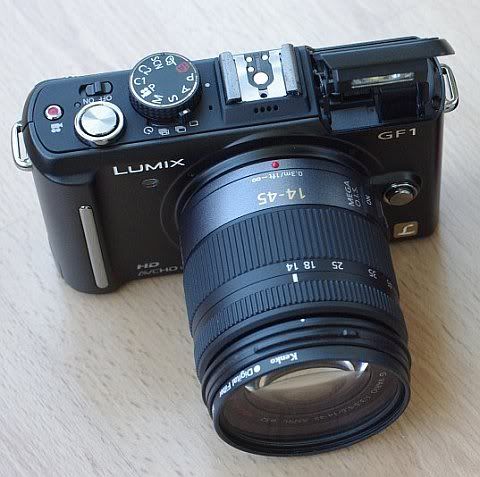
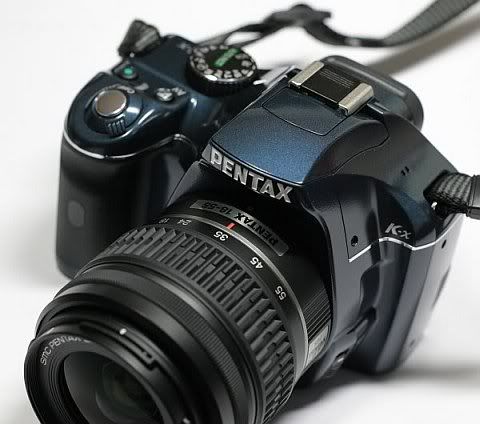
Since January 2004, I have purchased nine DSLR and ILDC bodies. Below is the history and summary:-
2004: Pentax *ist D
2005: Pentax *ist DS
2006: Pentax K100D
2007: Canon EOS 5D
2009: Pentax K-m, Panasonic GF-1 (K-7 pre-order was cancelled, deposit refunded)
2010: Pentax K-x, Sony NEX-3
2011: Pentax K-r (K-5 pre-order was cancelled, deposit refunded)
And, some photos of my gear:-


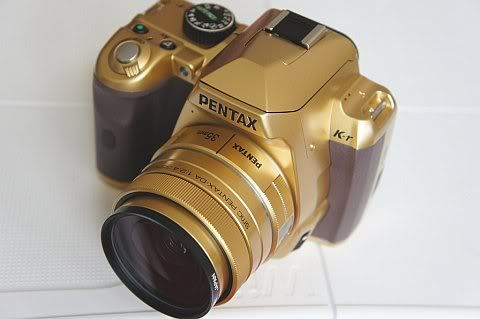
So, what will be my next body? NEX-7/5N? The rumoured Canon 5D III? Or, the Pentax Q (Just!)? :-o Which one? Actually, I just don't know it myself, as I really don't have a crystal ball to tell! ;->
Besides, it is interesting to note that my Canon Full Frame 5D is the only digital camera body that could stop me from buying yet another new camera for two years long, "momentarily"!~ Indeed, no other body could "achieve" that so far! ;-p
Btw, I actually pre-ordered the K-7 back to 2009 at least one month before it was announced and also for the K-5 earlier this year with about 10% deposit money paid. But however, owing to various (unsatisfactory) performance and/or quality issues with the camera and bodies I received, I felt obliged to cancel both orders and opted to wait for the "next"! >:-( So, if I could "successfully" acquire them, I should already have had 11 digital bodies up till now, instead of 9 only. Nevertheless, do note that most of them are still Pentax ones, after all! :-o
Related:-
My 7th Pentax SLR Body?
The World First / Pentax First: My (Obsolete) Pentax Collection
Summary Matrix for Equipment Tests and Reviews
Ten Things that I Want Ricoh to Do for Pentax
2004: Pentax *ist D
2005: Pentax *ist DS
2006: Pentax K100D
2007: Canon EOS 5D
2009: Pentax K-m, Panasonic GF-1 (K-7 pre-order was cancelled, deposit refunded)
2010: Pentax K-x, Sony NEX-3
2011: Pentax K-r (K-5 pre-order was cancelled, deposit refunded)
And, some photos of my gear:-
So, what will be my next body? NEX-7/5N? The rumoured Canon 5D III? Or, the Pentax Q (Just!)? :-o Which one? Actually, I just don't know it myself, as I really don't have a crystal ball to tell! ;->
Besides, it is interesting to note that my Canon Full Frame 5D is the only digital camera body that could stop me from buying yet another new camera for two years long, "momentarily"!~ Indeed, no other body could "achieve" that so far! ;-p
Btw, I actually pre-ordered the K-7 back to 2009 at least one month before it was announced and also for the K-5 earlier this year with about 10% deposit money paid. But however, owing to various (unsatisfactory) performance and/or quality issues with the camera and bodies I received, I felt obliged to cancel both orders and opted to wait for the "next"! >:-( So, if I could "successfully" acquire them, I should already have had 11 digital bodies up till now, instead of 9 only. Nevertheless, do note that most of them are still Pentax ones, after all! :-o
Related:-
My 7th Pentax SLR Body?
The World First / Pentax First: My (Obsolete) Pentax Collection
Summary Matrix for Equipment Tests and Reviews
Ten Things that I Want Ricoh to Do for Pentax
Monday, October 10, 2011
Dust Accumulates Inside the LCD of K-5 Silver
A K-5 Silver user reports that the LCD of his Special Edition K-5 is collecting dust and now it is looking like this:-
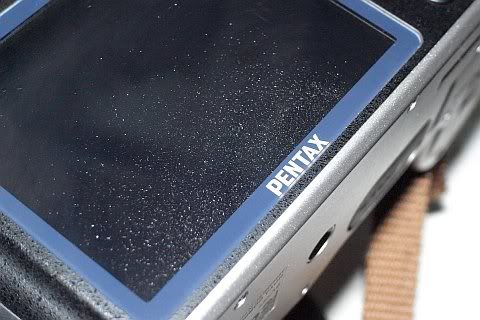
(Click to Enlarge in New Tab/Window)
Oh, it's too terrible! >:-{
He tells that he has used his unit for two months only and it was not like that when it was new! Indeed, in the same thread, there are users of K-7, K20D and K10D report the same, here, here and here, respectively.
So, this issue seems to be not uncommon. And the really worrisome thing is that it is found to be persistent since the first "Weather-Resistant" Pentax DSLR model K10D, back to 2007. The most strangest thing is that it happens mostly for those Pentax WR bodies, but rarely heard for non-WR entry-level Pentax DSLR bodies, on the other hand. Well, it seems that the weather-sealing is actually the culprit to this issue! E.g., when it was just not properly assembled out of the Pentax factory or when the sealing rubber and/or other materials are changing its/their state(s) over time?? :-o
Update (10-11):-
Thanks to Blog reader "calluses", we have the following yet another report from a Japanese user for exactly the same issue, also for a Silver K-5:-

(Source: http://d.hatena.ne.jp/hisway306/20110324/1300971454#seemore, in Japanese, Google English translation can be found here)
It is told that the above dust accumulated inside the LCD just from the very beginning and thus the user immediately asked for a direct replacement from the dealer and he got his replacement unit without any difficulty. It is also told that the replacement unit of his have not had the same issue after then.
Update (10-13):-
Yet here is another report of the same issue, for an ordinary black K-5:-
http://forum.xitek.com/showthread.php?threadid=924323
(in Chinese, English Here (Google-translated))
Of course, the user is pissed off. >:-(
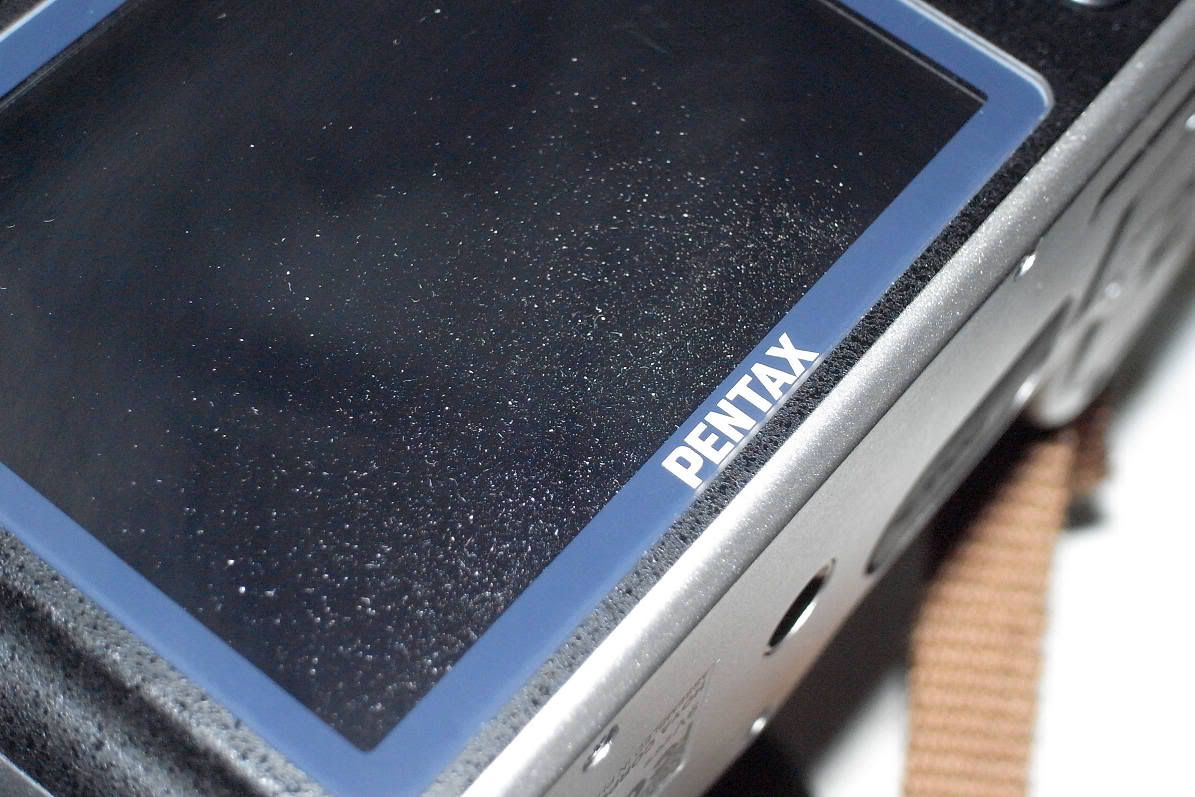
(Click to Enlarge in New Tab/Window)
Oh, it's too terrible! >:-{
He tells that he has used his unit for two months only and it was not like that when it was new! Indeed, in the same thread, there are users of K-7, K20D and K10D report the same, here, here and here, respectively.
So, this issue seems to be not uncommon. And the really worrisome thing is that it is found to be persistent since the first "Weather-Resistant" Pentax DSLR model K10D, back to 2007. The most strangest thing is that it happens mostly for those Pentax WR bodies, but rarely heard for non-WR entry-level Pentax DSLR bodies, on the other hand. Well, it seems that the weather-sealing is actually the culprit to this issue! E.g., when it was just not properly assembled out of the Pentax factory or when the sealing rubber and/or other materials are changing its/their state(s) over time?? :-o
Update (10-11):-
Thanks to Blog reader "calluses", we have the following yet another report from a Japanese user for exactly the same issue, also for a Silver K-5:-
(Source: http://d.hatena.ne.jp/hisway306/20110324/1300971454#seemore, in Japanese, Google English translation can be found here)
It is told that the above dust accumulated inside the LCD just from the very beginning and thus the user immediately asked for a direct replacement from the dealer and he got his replacement unit without any difficulty. It is also told that the replacement unit of his have not had the same issue after then.
Update (10-13):-
Yet here is another report of the same issue, for an ordinary black K-5:-
http://forum.xitek.com/showthread.php?threadid=924323
(in Chinese, English Here (Google-translated))
Of course, the user is pissed off. >:-(
Subscribe to:
Posts (Atom)